
Loading Untangle: Line Brain Puzzle...
Untangle: Line Brain Puzzle
Untangle: Line Brain Puzzle
That satisfying feeling when tangled lines finally clear? That's Untangle.
Move the dots. Watch the lines. Solve the puzzle.
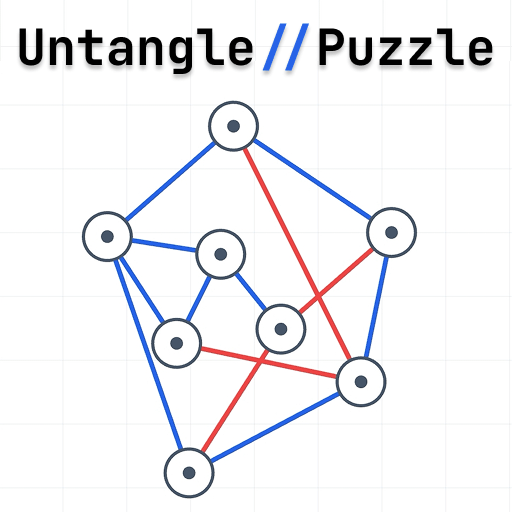
Untangle is a clean, minimal brain puzzle game. Dots are connected by lines — but the lines cross each other in a tangled mess. Your job: drag the dots into positions where no lines cross. When every line turns blue, the puzzle is solved.
HOW TO PLAY
- Tap and drag any dot to reposition it
- Red lines = crossing — fix them
- Blue lines = clear — keep going
- All blue? You solved it. Next level unlocks.
Simple to learn. Genuinely hard to master.
FEATURES
✦ 60 handcrafted levels — each one a unique spatial puzzle
✦ Scales from 4 dots to 22 dots as you progress
✦ Live visual feedback — lines change color as you drag
✦ Reset & re-scramble — retry any level, any time
✦ Level select & progress tracking
No ads. No timers. No energy bars. Just pure puzzles.
WHO LOVES IT
✔ Brain teaser fans who want a real challenge
✔ Logic & math lovers
✔ Anyone who finds tap-and-swipe games too easy
✔ People who love that "aha!" moment when it all clicks
THE CHALLENGE
The first few levels will feel easy. By level 20, you'll be genuinely thinking. By level 40, you'll be hooked. No two puzzles solve the same way — every arrangement is yours to discover.
Can you untangle them all?
Controls
Desktop Controls
Click and drag nodes to move them. Use Reset to restart or Re-scramble for a new arrangement.
Mobile Controls
Touch and drag nodes to move them. All controls are touch-optimized.
Pro Tips
Focus on nodes with many connections first. Move nodes to separate crossing lines. When all lines turn blue, you've solved it!
Frequently Asked Questions
What is an untangle puzzle game?
An untangle puzzle game presents you with a set of dots connected by lines that cross each other. Your goal is to drag the dots into new positions so that no lines intersect — turning all edges from red to blue.
How do I play Untangle: Line Brain Puzzle?
Tap or click any dot and drag it to a new position. Crossing lines appear in red. Rearrange the dots until all lines turn blue — meaning no edges intersect. Complete all 60 levels to finish the game.
How many levels does Untangle have?
Untangle: Line Brain Puzzle has 60 handcrafted levels. Difficulty increases progressively, starting with 4 dots and scaling up to 22 dots in the later stages.
Is Untangle free to play?
Yes. Untangle is completely free to play online at FreeGameToPlay.com. No download, no registration, and no in-app purchases required.
Can I play Untangle on my phone?
Yes. Untangle is fully mobile friendly and works on all smartphones and tablets through your mobile browser — no app download needed.
Is Untangle good for brain training?
Untangle is an excellent spatial reasoning and logic game. It challenges you to visualise and rearrange structures, which exercises problem-solving, pattern recognition, and visual-spatial thinking.